

Hridyaa Image Compressor and Optimizer
WordPress plugin that converts JPEG, PNG, and GIF media to WebP on your own server. AVIF conversion is available in Hridyaa Image Compressor and Optimizer Pro.
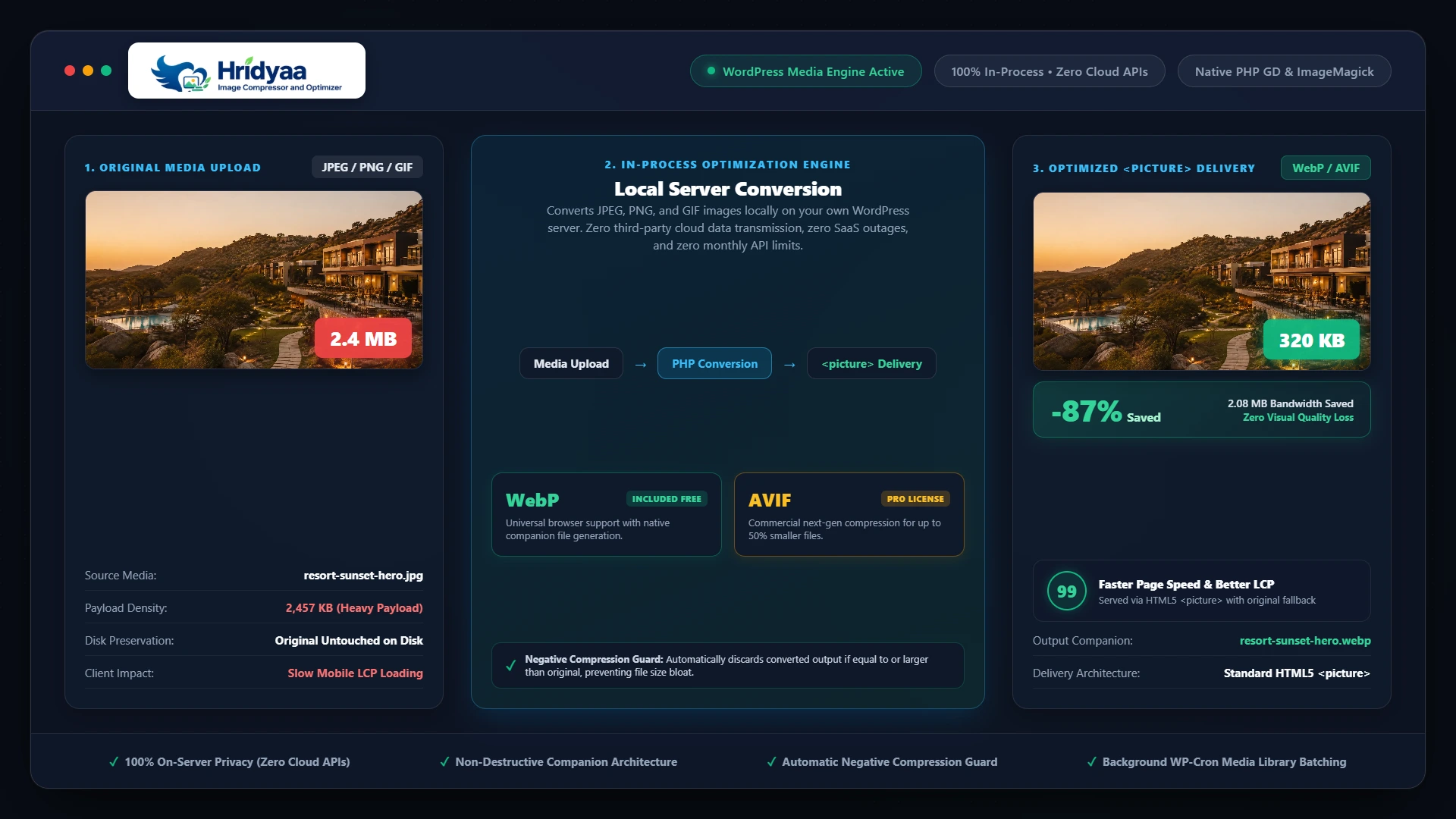
On-Server WebP & AVIF Image Compression Engine
Convert JPEG, PNG, and GIF media library uploads to high-density WebP and AVIF formats in-process on your own server, deliver standard HTML5 <picture> elements, and eliminate third-party cloud image subscriptions.
Modern Next-Gen Formats
Converts JPEG, PNG, and GIF images locally into WebP via PHP GD or ImageMagick, with commercial AVIF support provided in Pro for up to 50% smaller files.
100% Original Safety
Original high-resolution uploads remain untouched on disk; converted files are written as companion .webp and .avif assets alongside.
Zero Size Regressions
Automatically discards converted files if output size is equal to or larger than original assets, preventing unexpected file size bloat.
100% On-Server Privacy
All image processing runs in-process on your WordPress host; zero external image data transmission, zero SaaS outages, and zero monthly conversion limits.
Faster page loads without recurring SaaS image bills or cloud dependencies
Heavy image payloads slow down Largest Contentful Paint (LCP) and waste mobile bandwidth. Hridyaa Image Compressor and Optimizer generates modern formats directly on your WordPress server.
1. In-Process Server Conversion
Many image optimization plugins charge per-image monthly fees and route private assets through third-party cloud SaaS infrastructure. Hridyaa Image Compressor and Optimizer executes all conversions in-process on your own web server via native PHP extensions (ext-gd or ext-imagick) with zero monthly conversion caps.
2. Standards-Compliant <picture> Delivery
Rewrites content images and responsive thumbnail matrices to clean HTML5 <picture> elements with prioritized MIME types. Browsers that support modern formats receive ultra-compact WebP or AVIF streams, while older clients seamlessly receive the original image file.
3. Non-Destructive Companion Architecture
Master uploads are never overwritten or altered. Converted assets are generated alongside originals with appended extensions (such as photo.jpg.webp and photo.jpg.avif). Deactivating or uninstalling the plugin leaves your master media files 100% intact.
Core Practical Benefits
-
✓
Local WebP conversion: In-process conversion for JPEG, PNG, and GIF media library uploads.
-
✓
Commercial AVIF Pro engine: Next-generation compression delivering ultra-dense image payloads.
-
✓
HTML5 <picture> output: Native responsive delivery with automatic fallback to original assets.
-
✓
Background WP-Cron batching: Asynchronous headless processing for large existing media libraries.
-
✓
Visual difference slider: In-admin split-view preview to inspect compression fidelity.
-
✓
Storage metrics dashboard: Real-time tracking of bytes saved and format distribution.
-
✓
Negative compression guard: Discards conversions if output size exceeds the original file.
-
✓
Staging auto-classification: Up to 5 staging/development environments included per Pro license.
-
✓
Zero external image transmission: 100% on-server execution with zero third-party data leakage.
How Image Optimization Works
A four-stage processing pipeline engineered for high visual fidelity, execution safety, and zero frontend layout shift.
DETECT
Monitors uploads, validates mime types and magic bytes, and registers thumbnail dimensions.
CONVERT
Encodes WebP and AVIF in-process using PHP GD or ImageMagick with configured quality parameters.
GUARD
Compares output bytes; discards conversions larger than originals and writes valid companions atomically.
DELIVER
Serves responsive HTML5 <picture> elements on page render with native fallback to master files.
Engineered for Performance, Preservation & Privacy
Every conversion subsystem is designed to optimize media assets safely without breaking layout constraints or modifying master uploads.
In-Process Local Conversion Engine
Does image processing run locally on the WordPress server?
Employs local graphics libraries (ext-gd or ext-imagick) to encode WebP and AVIF without cloud API latency or third-party quotas.
- In-memory stream processing with configurable compression quality targets
- Automatic adapter fallback between PHP GD and ImageMagick extensions
- Animated GIF safety skipping to preserve multi-frame animation integrity
- Zero external network roundtrips or third-party image processing latency
Non-Destructive Companion Architecture
Are original high-resolution uploads modified or deleted?
Retains master uploads in their original form and writes converted formats as companion files alongside original media.
- Preserves
photo.jpgunmodified while creatingphoto.jpg.webpandphoto.jpg.avif - Companion file cleanup synchronized to native WordPress attachment deletion hooks
- Safe uninstallation leaving master media library assets completely intact
- Atomic file writes with temporary scratch naming and path constraint checks
Smart Negative Compression Guard
What happens when converted files are larger than originals?
Automatically detects and discards conversions that exceed original file size to prevent performance regressions.
- Pre-write byte comparison preventing larger output assets from being stored or served
- Protects small or pre-optimized PNG graphics from file size bloat
- Continues serving original asset seamlessly without errors or broken links
- Logs skipped items with structured status codes to the admin dashboard
HTML5 <picture> Delivery & Fallback
How are modern image formats delivered to diverse browsers?
Dynamic the_content and post thumbnail filter rewriting to standards-compliant HTML5 <picture> tags.
- Generates nested
<source type="image/avif">and<source type="image/webp">elements - Fallback
<img>tag points directly to the original master asset - Preserves intrinsic dimensions (
width&height) to eliminate layout shift (CLS) - Full compatibility with responsive
srcsetandsizesattributes
Scheduled WP-Cron Background Batching
Can large media libraries with thousands of images be optimized safely?
Non-blocking asynchronous conversion queue running under scheduled WordPress background events.
- Chunked batch execution preventing PHP memory exhaustion and gateway timeouts
- Isolated error tracking with structured failure codes for unreadable media
- Automatic resumption on failure without duplicate or redundant processing
- Admin bulk optimizer interface with real-time progress indicators
Visual Difference Slider & Storage Metrics
Can administrators inspect compression fidelity visually?
In-admin split-screen visual comparison tool and sitewide optimization telemetry dashboard.
- Interactive before-and-after split view slider for visual quality verification
- Real-time sitewide storage savings metrics across JPEG, PNG, and GIF libraries
- Format distribution breakdown comparing original vs WebP vs AVIF storage
- Environment diagnostics inspector checking PHP extensions and memory constraints
Built-in Admin Capabilities
Comprehensive tools to monitor compression efficiency, inspect visual fidelity, and manage background conversion queues.
Interactive Difference Slider
Split-view visual comparison tool in wp-admin allowing side-by-side inspection of original and compressed assets.
Environment Diagnostics
Automated server checks verifying PHP version, GD and ImageMagick delegates, memory limits, and execution timeouts.
Storage Savings Ledger
Live calculation of bytes saved across JPEG, PNG, and GIF libraries with per-format compression percentages.
WP-Cron Batch Runner
Headless background queue with configurable batch sizes, failure logging, and graceful timeout recovery.
Ed25519 Cryptographic Licensing
Secure offline verification cache enabling 7 days of uninterrupted operation during network or server maintenance.
Staging Auto-Classification
Automatically identifies staging and local development domains, covering 1 production + up to 5 staging environments.
Free Core vs. Pro Commercial Edition
Choose the edition that fits your performance targets and operational requirements.
Essential On-Server WebP Optimization
Everything you need to compress media library uploads locally into WebP, output responsive HTML5 <picture> elements, run scheduled background batch conversions, and safeguard original media files with zero third-party cloud dependencies.
- In-process WebP conversion for JPEG, PNG, and GIF
- HTML5
<picture>tag delivery with legacy fallbacks - Scheduled WP-Cron background batch processing
- Smart negative compression guard preventing file bloat
- Non-destructive companion file preservation
- Unlimited local image conversions on your web server
Ultra-Dense AVIF & Visual QA Workflow
-
✓
All Free Core capabilities included: Full local WebP conversion and
<picture>delivery. -
✓
Commercial AVIF conversion engine: Up to 50% smaller file sizes than traditional formats.
-
✓
Interactive visual difference slider: In-admin before-and-after quality preview tool.
-
✓
Storage metrics dashboard: Real-time tracking of bytes saved across your media library.
-
✓
Staging auto-classification: Covers 1 production site + up to 5 automated staging sites.
-
✓
365 days of automated updates: One-click updates in wp-admin and direct engineering support.
Designed for Lightweight Production WordPress
Built with modern object-oriented PHP and strict separation of concerns; 100% on-server execution with zero external image data transmission.
Technical Specifications
Supported Formats & Encoders
Native support for major web image formats with automatic format detection and fallback:
Privacy & Network Architecture
All image processing executes locally on your server. Zero media files or customer data are ever transmitted to external cloud APIs. The Pro add-on connects to the license server solely for license activation, verification, and update checks.
Simple, Transparent Licensing
Annual per-site licensing in Indian Rupees with full feature access and automated updates. GST invoices included.
Hridyaa Image Compressor and Optimizer Pro
PRO-1YR- Local WebP Conversion: Fast in-process conversion on your server
- Commercial AVIF Engine: Ultra-dense modern compression via GD & Imagick
- HTML5 <picture> Delivery: Native modern delivery with legacy fallbacks
- Scheduled WP-Cron Batching: Asynchronous headless media optimization
- Visual Difference Slider: Interactive before-and-after quality preview
- Optimization Dashboard: Real-time storage savings metrics
- Non-Destructive Companion Model: Original media files preserved 100%
- Negative Compression Guard: Oversized files discarded automatically
- Staging Auto-Classification: Up to 5 staging sites included free
- Direct Support: Engineering assistance from Ankit Rawat